
Morgen is a daily planner that prioritizes your most important to-dos, events, and projects in one app. Get AI-powered recommendations or plan manually.
Tasks tags, better recurring logic, and routines
Morgen released v4 and it isn’t just about the web, it’s also a major step forward for task management.
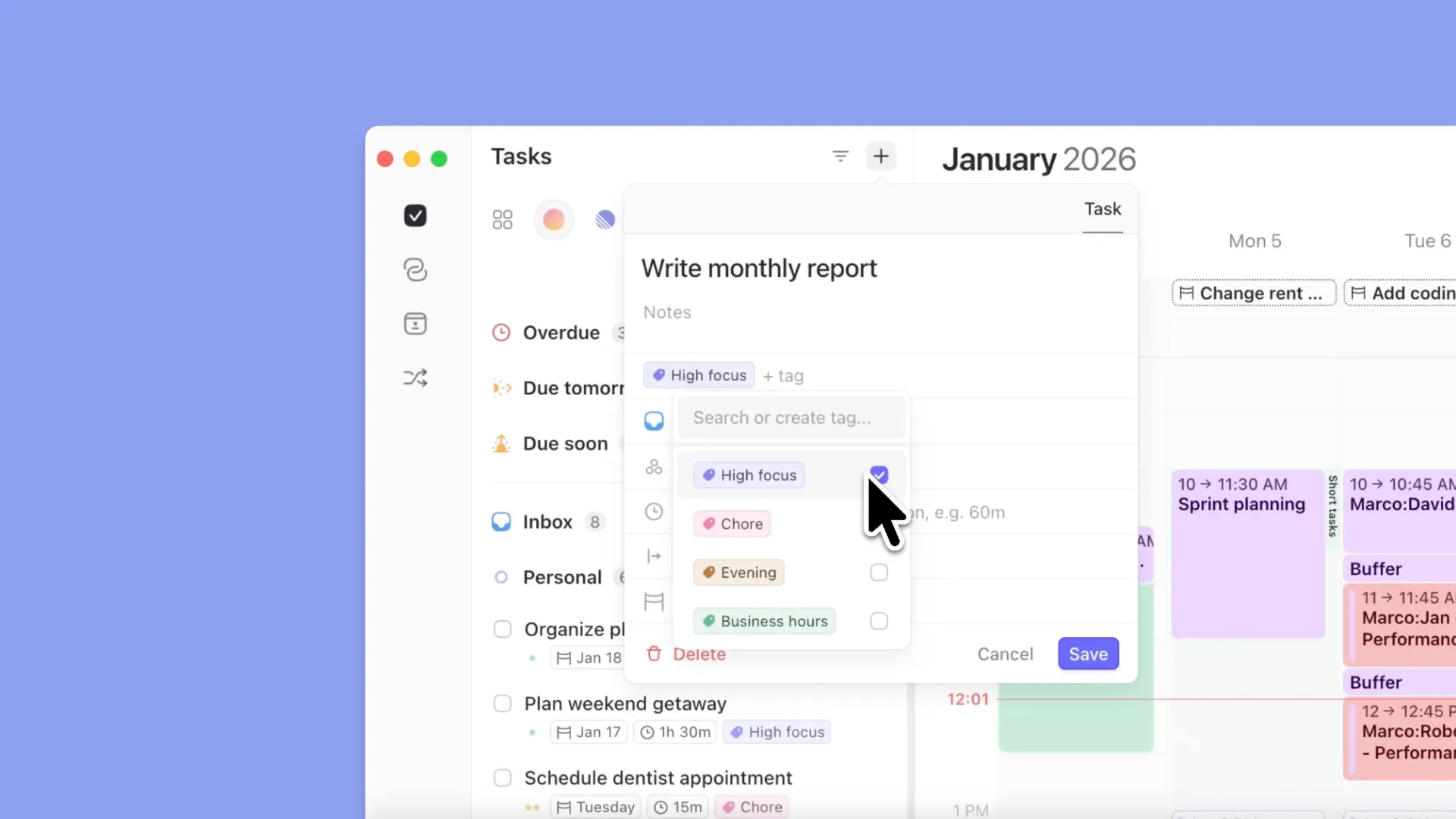
Task tags
You can now add tags to tasks, create them on the fly with #, customize their colors, and use them everywhere:
Group or sort task lists by tag
Filter tasks by tag (including in Frames and the Planner)
Use tags for areas of life, energy levels, context, or anything else you like
Tags work consistently across desktop, web, and mobile.
A clearer split: Routines vs recurring tasks
Routines are for things that do happen at a specific time—like breakfast, lunch, workouts, or evening shutdowns.
Recurring tasks are now driven by repeating due dates, not fixed calendar slots.
Perfect for things like weekly reviews or daily check-ins that need to happen regularly, but not at a specific time.
🔮 Routines live directly on the calendar, repeat automatically, and don’t clutter your task lists. This distinction removes a lot of friction and makes both planning and task lists much cleaner.
Smarter scheduling feedback
Tasks now behave more intelligently when scheduled:
Tasks scheduled in the past remain visible (instead of disappearing)
Hovering on the task panel calendar tooltip shows clear feedback on completed vs. remaining time and the scheduled sessions
More control over colors and visual clarity
You can now assign a different color to specific task sessions or events using a color palette, instead of being limited to task list colors.
This makes it easier to visually distinguish:
Different routines
Specific task sessions
Task types or contexts
On shared calendars, routines and tasks remain clear and readable, with consistent visual meaning.
Mobile app upgrades
Morgen v4 brings feature parity between desktop, web, and mobile closer:
Routines and task colors are fully supported on mobile
You can create events, tasks, or routines directly from the calendar
All task metadata (tags, estimates, earliest start, due dates) is editable
You can now edit the entire series of recurring events or routines on mobile, not just single instances
Extended day view for night and shift work
For those who work late or overnight, you can now extend your calendar view beyond midnight (up to a full 24-hour range).
This makes night shifts, late work sessions, or long days much easier to reason about, without breaking the structure of the calendar.
Simplified setup, same privacy guarantees
In v3, some integrations had to be connected twice, once locally and once via the cloud. In v4, that complexity is gone. You now connect an integration once, and it’s automatically available everywhere: desktop, web, and mobile.
We continue to uphold our privacy commitment:
No calendar data is stored on Morgen’s servers
Data is proxied securely but never persisted
You can read more in our privacy policy.
Integration updates
Alongside the architectural changes, v4 includes notable integration improvements:
Obsidian (Bases support): More flexibility for managing notes and tasks
Microsoft Teams auto-connect: Connecting a Microsoft calendar now automatically enables Teams, making meeting links and scheduling links seamless